Infinity Nikki’s Social Compass: Unlocking the Art of Friendship
Add friends in Infinity Nikki via the Pear-Pal and 30-day friend code to unlock global creator connections and a vibrant social wardrobe.
Stepping into the whimsical world of Infinity Nikki feels like opening a storybook that never ends. The game’s breathtaking landscapes and emotionally resonant narrative have kept my stylist journey alive well into 2026, but I quickly realized that even in a primarily single-player experience, the true magic lies in the connections you forge along the way. Adding friends isn’t just about a chat window—it’s about weaving your own thread into a tapestry of global creators, much like finding a hidden pocket dimension within an already boundless wardrobe.
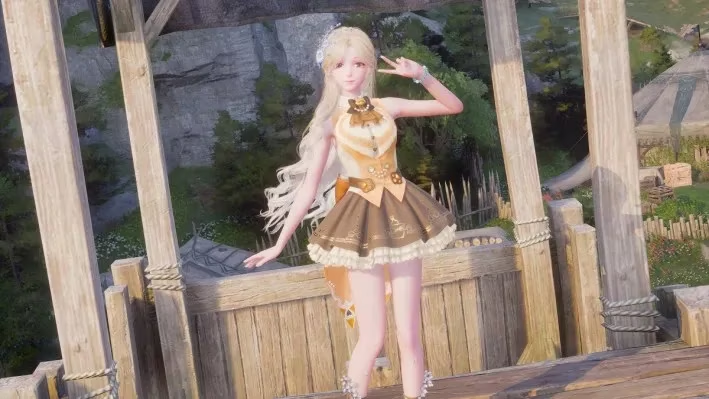
Before you can send a stylist signal to another player, you need the essential gadget that every Miraland resident carries: the Pear-Pal. Think of it as a social passport that materializes the moment you join the stylist guild in Florawish. This happens extremely early in the main story—within the first hour or two—and it’s handed to you by Dada as an honorary gift. I still remember the moment I accepted it, clueless that this sleek tablet would become my gateway to a hidden community. Without the Pear-Pal, the entire friend system remains locked, like a sealed envelope that only the guild’s blessing can open.
Now, let’s walk through the actual process, which has remained refreshingly stable even as Infinity Nikki received its 2026 quality-of-life updates. From my experience, the interface acts like a well-tailored garment—everything fits snugly once you know the measurement points.
📲 Generating Your Friend Code: The 30-Day Golden Key
-
Open the Pear-Pal from your in-game menu. The icon will be visible once you’ve joined the guild.
-
Navigate to the “Friends” tab. It’s the hub where all your current connections live.
-
In the right-hand corner, select “Add Friends” — this might feel like opening a secret compartment.
-
On the new page, you’ll see the option to “Get Friend Code”. On console (PS5), this is triggered by pressing up on the D-pad. On mobile or PC, a dedicated button appears on screen.
-
A unique, alphanumeric code flashes onto your screen, almost like a magical incantation.
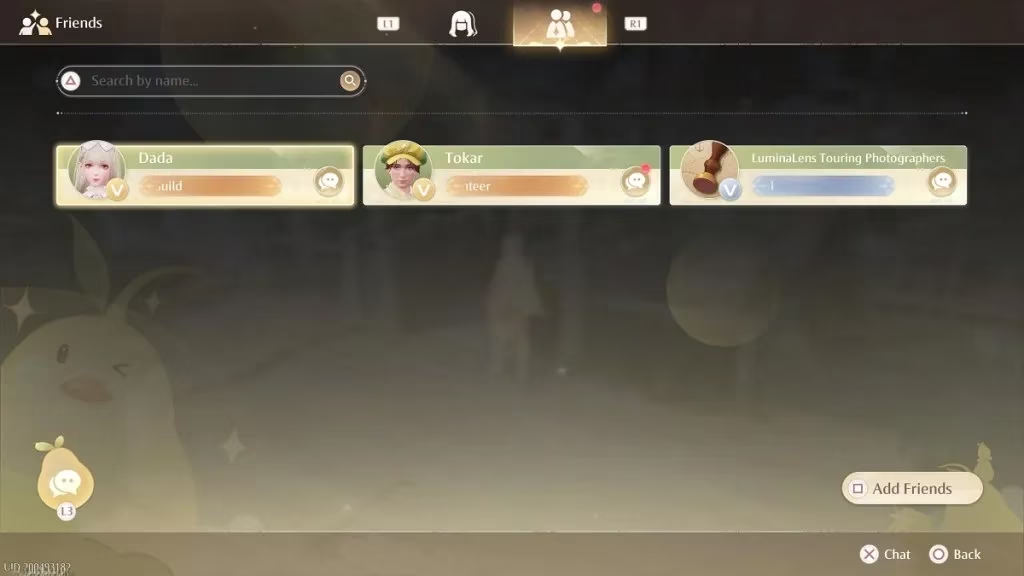
Here’s where Infinity Nikki’s design philosophy truly shines: the code remains valid for 30 whole days, and if you use it to befriend someone, it doesn’t self-destruct. This is a stark contrast to the frantic, self-expiring keys I’ve encountered in other live-service titles. It’s as if the developers handed us a leisurely handwritten invitation rather than a ticking time bomb. I’ve often described this system to newcomers as a glow-in-the-dark constellation — the points are visible for a generous window, and once you connect them, they stay lit permanently. You don’t need to synchronize schedules perfectly; you can share your code on a community Discord, jot it down in a notebook, or whisper it to a friend you meet in a styling contest, knowing it will still be there when they log in three weeks later. This patient approach makes the social layer feel like an organic extension of the game’s cozy DNA.
🤝 Using Someone Else’s Code to Add a Friend
If you’re holding a code from another player—perhaps shared via a Miraland fan group or through the in-game chat (once you have at least one friend)—the path is symmetrical:
-
Head back to “Add Friends” on the Pear-Pal.
-
You’ll find an input field ready to accept the code. Type it in carefully (case sensitivity matters).
-
A friend request will soar across the servers, and as soon as the other person accepts, your friendship is sealed.
From that moment, a dedicated chat channel opens. I’ve used it to coordinate group photos, exchange styling tips, or simply marvel at how many ways you can pose in front of the Swan Gazebo. While Infinity Nikki still lacks traditional multiplayer like co-op quests—as of 2026, the focus remains on solo exploration—the social features act as a quiet, steady drumbeat behind the main symphony.
🔒 Managing Your Social Circle: Blocklist and More
Curating your friend list is just as important as building it. Infinity Nikki gives you simple tools for that. On the same friend page, pressing down on the D-pad (on PS5) or tapping the corresponding icon on other platforms reveals your blocklist. I admire how intuitive this placement is; it’s like having a small safety pin tucked behind a lapel—unobtrusive but immediately accessible if needed. You can review blocked players, remove them, or simply have the peace of mind that your stylist journey remains a safe space.
✨ Why This System Still Matters in 2026
After months of living in Miraland, I’ve come to view the friend code mechanic as a rare gem. In an era where many games force intrusive social integrations or constant online tethering, Infinity Nikki offers a deliberately paced, almost epistolary exchange between stylists. You exchange a code, wait for acceptance, and then the connection blooms. It mirrors the act of receiving a letter in a beautifully crafted box—no urgency, just a quiet celebration of meeting another dreamer.
Whether you’re on Android, iOS, PS5, or PC, the steps remain identical, creating a seamless cross-platform web. The only prerequisite is that hour or two spent reaching the Florawish stylist guild, a journey that itself acts as a soft tutorial for the wonders to come.
So go ahead, generate your code, and send it out into the world like a paper boat on a serene lake. You never know which fellow stylist will pick it up and turn your solo adventure into a shared memory.
Quick At-a-Glance Summary
| Step | Action | Detail |
|---|---|---|
| 1 | Reach Florawish guild | Obtain Pear-Pal from Dada |
| 2 | Open Pear-Pal > Friends > Add Friends | Enter the social interface |
| 3 | Select “Get Friend Code” | Press up on D-pad (PS5) or use on-screen button |
| 4 | Share the 30-day code | It doesn’t expire after use |
| 5 | Input a friend’s code | To send them a friend request |
Infinity Nikki’s world grows larger when you’re not walking it alone—and these simple codes are the keys that unlock that invisible bridge.
As you delve deeper into the stylistic realms of Infinity Nikki, it's always rewarding to have access to the best resources and opportunities to enhance your gaming experience. Whether you're looking to expand your wardrobe in the game or seeking new adventures, finding the right deals can make a significant difference. For those who thrive on exploring new horizons while keeping their gaming budget in check, staying updated on the latest offers is crucial.
If you're ready to expand your collection or simply want to explore new titles, consider checking out the best game deals available. DealNest offers a curated selection of discounts and promotions, helping gamers find the perfect additions to their digital libraries without breaking the bank. This way, you can continue to enjoy the vibrant world of Infinity Nikki, all while discovering new adventures and experiences across various platforms.